| NO. | Brand | Compatible P/N | Transceiver Type |
| 1 | NVIDIA/Mellanox | MFM1T02A-T | |
| 2 | Netgear | AXM765 | |
| 3 | D-Link | DEM-436XT-B1 | |
| 4 | Ciena | XCVR-A10Y31 | |
| 5 | Fortinet | FN-TRAN-SFP+GC | |
| 6 | Ubiquiti | UF-RJ45-10G | |
| 7 | Dell | GP-10GSFP-T | |
| 8 | Extreme Networks | 10338 | |
| 9 | IBM | 45W2410 | |
| 10 | HPE Aruba | JL563A | |
| 11 | Avaya Nortel | AA1403043-E6 | |
| 12 | HPE Aruba | R9F85A | |
| 13 | Mikrotik | S+RJ10 |
| HPE Aruba Compatible | R9F85A | Vendor Name | HYTOPTODEVICE |
| Form Factor | SFP+ (Hot-pluggable) | Data Rate | 10 Gbps (1G/2.5G/5G/10G Auto-negotiation) |
| Connector | RJ-45 | Cable Distance | 30m |
| Media | Copper | Cable Type | Cat6a/Cat7 |
| Max. Power Consumption | ≤2.5W | DDM Support | No |
| Protocols | IEEE 802.3an, IEEE 802.3az, SFF-8431 | Operation Temperature | 0 to 70°C (32 to 158°F) |
To ensure optimal performance, broad device compatibility, and extended hardware lifespan, please follow these deployment best practices for your 10GBASE-T SFP+ copper transceiver:
1. Cabling Requirements & Distance Limits
Recommended Cabling: For maximum 10Gbps transmission up to 30 meters, always use high-quality Cat6A or Cat7 Shielded Twisted Pair (STP) cables.
Legacy Cable Limitations: Unshielded Cat6 cables can theoretically support 10G up to 30–55m under ideal lab conditions, but in production environments, they are highly prone to signal degradation. Cat6A STP is strongly recommended.
2. EMI Protection & Crosstalk Mitigation
High-speed 10Gbps copper signals are extremely sensitive to Electromagnetic Interference (EMI) and Alien Crosstalk (AXT).
Use fully grounded STP/FTP cables and shielded RJ45 connectors.
Avoid running network cables parallel to high-voltage power lines, fluorescent lighting, or heavy industrial machinery.
3. Thermal & Power Management
10GBASE-T transceivers consume significantly more power (typically 2.5W) and generate considerably more heat than optical transceivers.
Port Spacing: Avoid populating adjacent SFP+ ports with copper transceivers continuously.
Airflow Optimization: Leave at least one empty port between copper modules (e.g., checkerboard or staggered layout) to facilitate heat dissipation and prevent thermal throttling.
4. Insertion & Hot-Plugging Sequence
While the transceiver is hot-swappable, following the correct sequence prevents electrical surge or signaling glitches:
Insert Module: Plug the transceiver into the SFP+ slot until it clicks, then pull down the bail latch to secure it in place.
Connect Cable: Plug the RJ45 cable into the transceiver.
To disconnect, always remove the RJ45 cable first before releasing the module latch.
5. System Recognition & Auto-Negotiation
Firmware: Ensure your switch or device firmware is updated to support 10GBASE-T copper transceivers.
Negotiation Delay: Allow 5–15 seconds after connection for the network OS (e.g., Juniper Junos, Cisco NX-OS) to auto-negotiate link speed and duplex status.
Auto-negotiation: The module auto negotiates speed (100M/1G/2.5G/5G/10G). Force speed manually on host port if negotiation instability appears.If the link fails to establish, manually set the port speed to 10G Full-Duplex instead of relying on auto-negotiation.
6. Physical Handling & Care
Always handle the module by its metallic casing or bail latch.
Do not touch the PCB gold fingers to prevent electrostatic discharge (ESD) and contact contamination.
Do not apply excessive force when plugging in or removing the RJ45 connector.
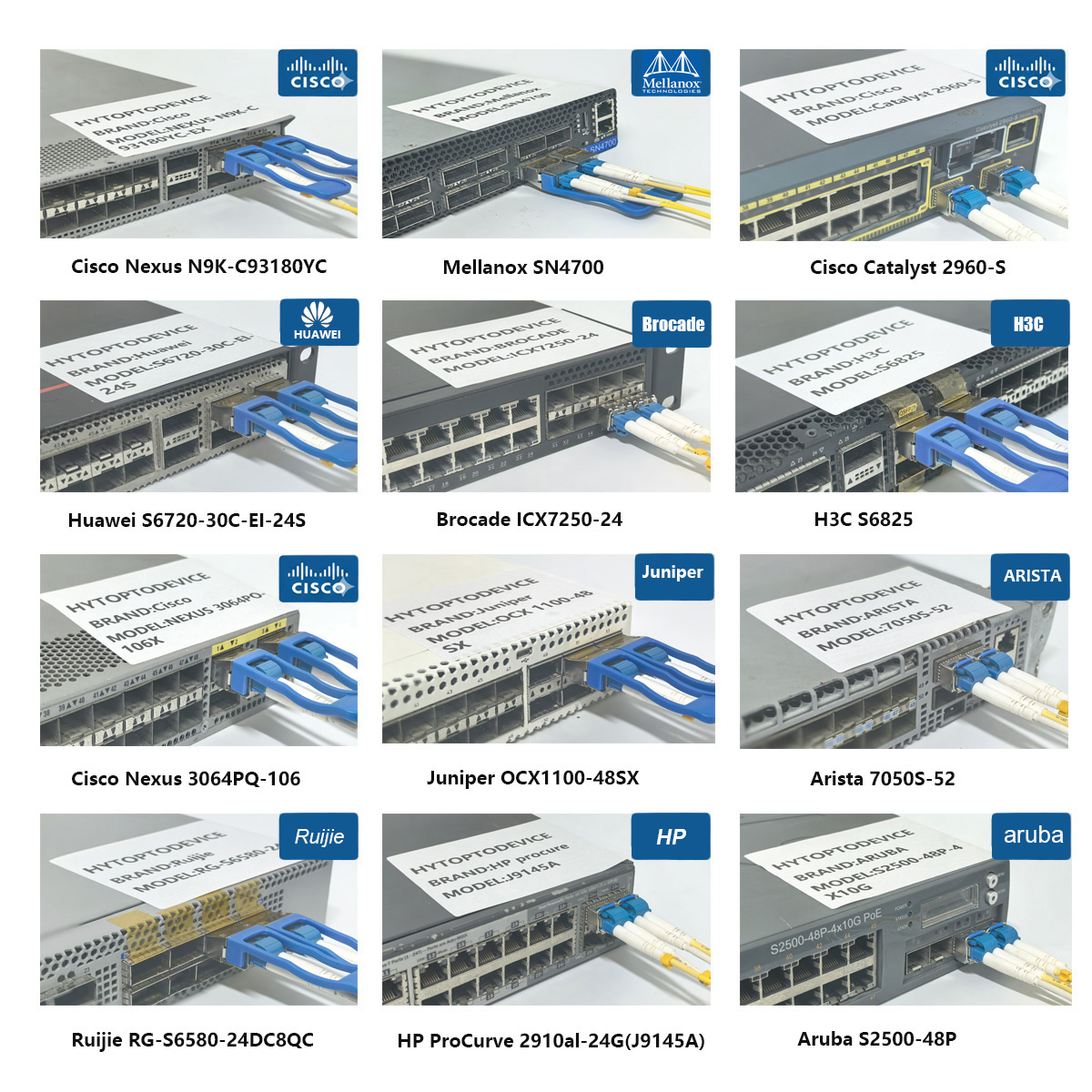
Built on SFP+ MSA and IEEE standards, this SFP+ copper transceiver also works with Cisco, Arista, Fortinet, Netgear, D-Link, Dell, Ciena, Extreme Networks and other mainstream network brands, flexible for multi-vendor enterprise and data center network upgrade projects.


The Core Features


FAQ
Q1: Can this HYTOPTODEVICE R9F85A compatible transceiver avoid unapproved transceiver warning logs on updated Aruba AOS-CX firmware?
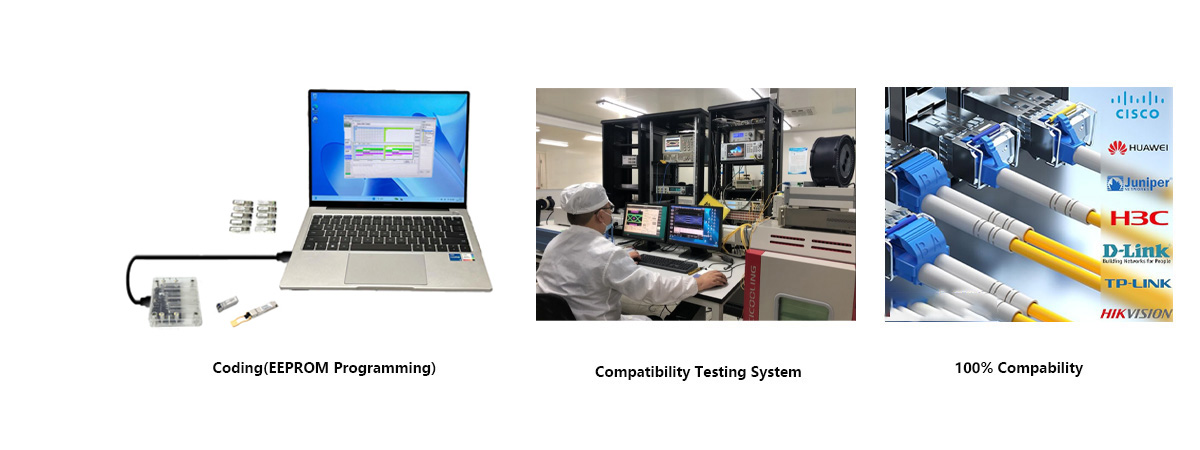
A: Yes. Our module is flashed with R9F85A native EEPROM identifiers. It can be identified automatically by the latest AOS-CX firmware, skipping the unrecognized transceiver warning without complicated manual configuration changes.
Q2: What separates this R9F85A Aruba compatible copper transceiver from generic MSA 10GBASE-T modules?
A: Generic MSA copper modules follow mechanical and electrical specifications but lack vendor-specific identity codes. Generic parts will trigger alert messages or port restrictions on locked Aruba firmware. HYTOPTODEVICE preloads R9F85A EEPROM profile for smooth integration on modern Aruba CX hardware.
Q3: Can I install this R9F85A compatible 10G copper transceiver inside SFP28 25G ports?
A: Yes, it physically fits into SFP28 slots and locks to 10G operation. It cannot achieve 25G throughput, as its built-in PHY chip only supports fixed 10GBASE-T operation. Double-check host port SFP+ compatibility before field deployment.
Q4: Does hot-plugging this copper transceiver into a live Aruba CX switch port risk permanent hardware damage?
A: No. This HYTOPTODEVICE SFP+ copper transceiver comes with built-in ESD protection and standard SFP+ hot-swap circuitry. Live insertion will not damage switch port hardware, though monitoring link state after insertion is recommended.
Q5: Is it safe to populate every SFP+ port on Aruba 8360 switches fully with these R9F85A compatible copper transceivers?
A: Not recommended without evaluating thermal and port constraints. Copper transceivers produce higher heat than fiber optics, and Aruba enforces port quantity limits for R9F85A modules. HYTOPTODEVICE recommends reserving airflow slots and respecting the official hardware thermal limits.
Q6: Will copper patch cable length affect the power draw of this 10GBASE-T transceiver?
A: Yes. Longer copper cabling requires extra signal equalization processing from the internal PHY chip, which slightly increases power consumption near the rated 30m maximum distance. HYTOPTODEVICE tests power consumption across different cable lengths during factory validation.
Q7: What maximum cable length can this R9F85A compatible transceiver maintain stable native 10G operation?
A: Reliable 10G transmission reaches up to 30 meters on certified Cat6a or Cat7 shielded twisted pair. Longer copper runs bring signal attenuation and crosstalk, leading to elevated bit error rates and packet loss. HYTOPTODEVICE validates each production batch at the full 30m rated distance.
Q8: What performance trade-offs appear when using regular Cat6 cable instead of Cat6a for this 10GBASE-T copper module?
A: Ordinary Cat6 cable can only sustain stable 10G speeds for shorter distances. At lengths close to 30m, crosstalk and signal degradation will raise BER. HYTOPTODEVICE recommends Cat6a shielded cabling to reach the full 30-meter rated performance.
Q9: Is shielded twisted pair required when deploying this HYTOPTODEVICE 10G copper transceiver in dense Aruba CX racks?
A: Highly recommended. Shielded STP/FTP cables reduce electromagnetic interference from adjacent power and network cables. Unshielded UTP may trigger random link flapping in crowded rack environments, even for cable runs shorter than 30 meters.
Q10: Can pre-existing in-wall copper cabling support 10GBASE-T links using this R9F85A compatible transceiver?
A: It depends on cable category and termination workmanship. Only Cat6a/Cat7 cabling under 30 meters delivers reliable 10G connectivity. Older Cat5e or poorly terminated wall cabling cannot maintain stable 10G links. HYTOPTODEVICE advises cable certification testing before deployment.
Q11: Will this HYTOPTODEVICE R9F85A copper transceiver automatically drop down to 1Gbps speed when connecting to 1G RJ45 endpoints?
A: No, this module uses fixed 10G hardware. It cannot auto-negotiate to 1G, 100M or 10Mbps. The peer network device must support 10GBASE-T to establish a valid link, matching the behavior of the original R9F85A OEM part.
Q12: Does this HPE Aruba R9F85A compatible 10G copper transceiver integrate Auto-MDI/MDIX functionality?
A: Yes, Auto-MDI/MDIX crossover capability is built in. Straight-through RJ45 patch cords work directly; crossover cables are no longer required for point-to-point device interconnections.
Q13: Does this R9F85A 10GBASE-T transceiver support IEEE 802.3x pause frame flow control on Aruba CX switches?
A: No. Consistent with original R9F85A specifications, this transceiver does not support IEEE 802.3x flow control. You need to apply traffic shaping for storage and high-volume data workload planning.
Q14: Is this HYTOPTODEVICE R9F85A compatible transceiver suitable for server rack and lab storage networking setups?
A: Yes. It provides affordable 10G RJ45 connectivity for servers and rack storage arrays. Many network integrators select our R9F85A compatible modules to cut hardware expenses compared to expensive OEM parts while preserving full interoperability.
Q15: What real-time telemetry metrics can network operators read from the DDM/DOM function on Aruba CX switches?
A: The DDM feature allows Aruba AOS-CX switches to pull live module temperature, supply voltage and link status data. This helps network teams monitor transceiver health and schedule proactive hardware replacement before unexpected link failures.
Q16: Can this R9F85A compatible transceiver interoperate with standard SFP+ 10G media converters?
A: Yes, it works with standard 10G media converters equipped with SFP+ slots, provided the media converter supports the 10GBASE-T standard. HYTOPTODEVICE completes cross-brand interoperability validation for mixed-vendor network upgrade projects.
Q17: Are JL563A and R9F85A both HPE Aruba 10GBASE-T RJ45 modules, what is the difference between these two SKUs?
A: Yes, both are Aruba SFP+ 10GBASE-T copper transceivers with a 30-meter Cat6a reach. The core difference lies in hardware and firmware compatibility. JL563A is an older end-of-sale model for legacy AOS/AOS-CX switches, while R9F85A is its newer replacement optimized for latest Aruba CX platforms and updated firmware releases. HYTOPTODEVICE can flash either EEPROM profile based on customer project requirements.
Packaging & Custom OEM Solutions
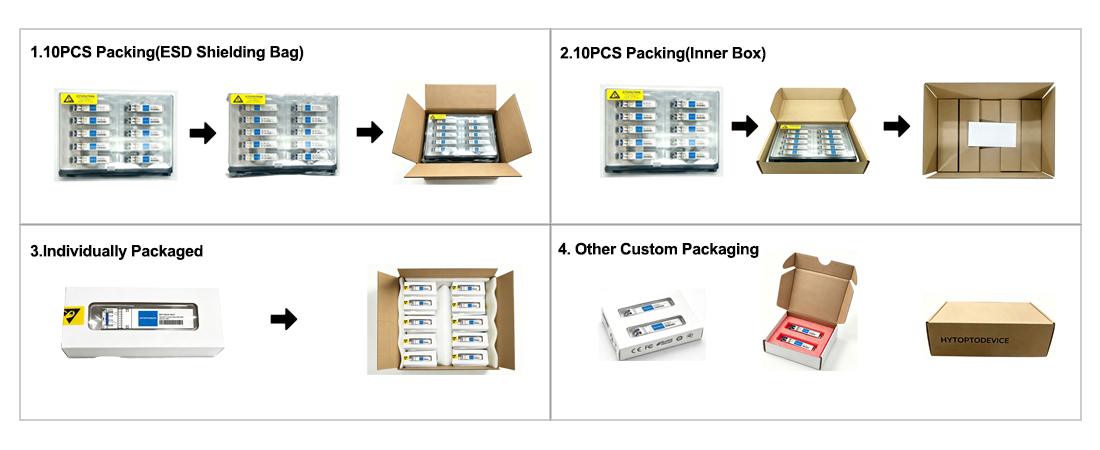
ESD Protection & Fast Shipping: Every module is sealed in an ESD-safe bag and ready for same-day dispatch from stock.
Custom OEM & Branding: We provide logo printing, private labeling, and custom packaging to help distributors and integrators build their brand—no factory investment required.
Why Network Engineers Choose HYTOPTODEVICE
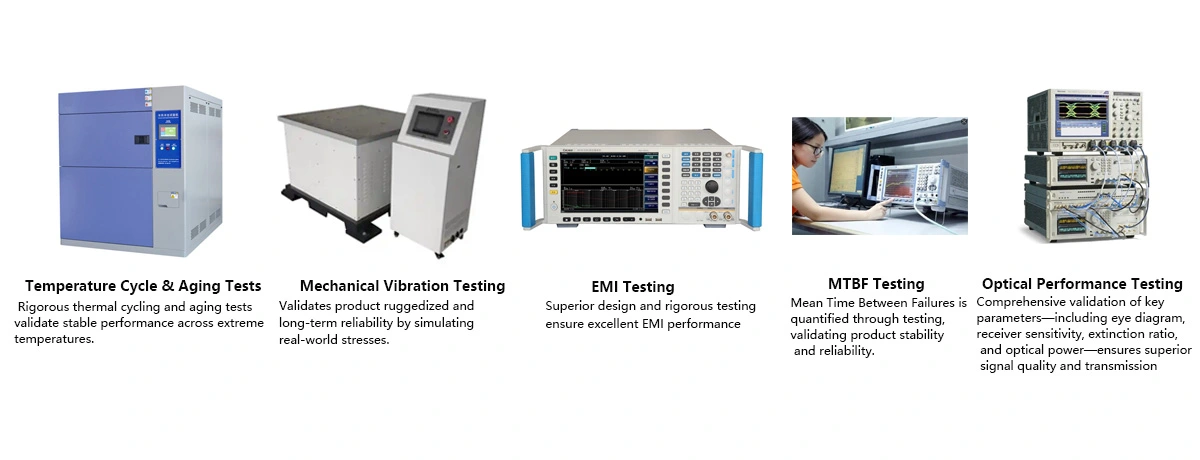
HYTOPTODEVICE has supplied over 5000,000 optical transceiver modules to data centers, ISPs, and enterprise networks across 100+ countries since 2011. Every module undergoes a 72-hour burn-in test and full DDM/DOM validation before shipment.
“Phenomenal performance. We deployed 200 HYTOPTODEVICE SFP modules to replace Cisco OEMs in our backbone network. Result? Zero compatibility issues and a 60% reduction in costs. Highly recommended for mission-critical networks."— Senior Network Engineer, Regional Telecom, Australia
Quality Certification & Compliance
At HYTOPTODEVICE, our quality commitment is backed by industry-standard validations. From fiber optical transceiver manufacturing to final visual inspection, from IQC、IPQC、FQC to OQC, our processes ensure global compliance and reliability.
We adhere to rigorous standards for our SFP modules and network solutions:
ISO 9001: Certified quality management and production consistency.
CE & FCC: Fully compliant for seamless Global Market Access.
RoHS: Committed to environmental responsibility and hazardous material control.
Proven Reliability: Rigorous testing to reduce compliance risk and ensure safety.
Certified Quality. Global Standards. Guaranteed Performance.